Decades to Days · now in private beta
Today, visibly
pointed somewhere.
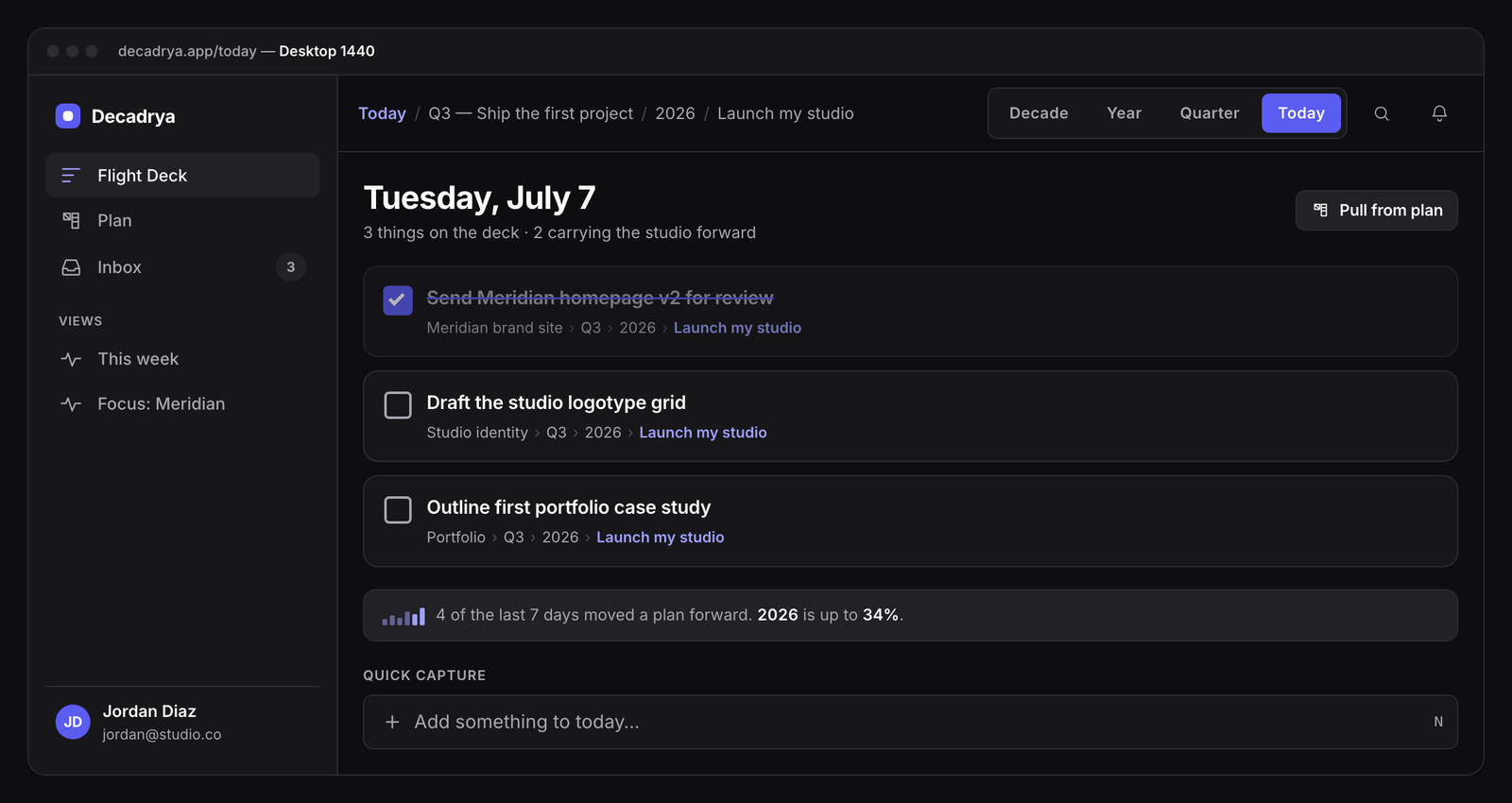
Todoist shows you today. Notion shows you everything. Decadrya shows you whether today is taking you where you said you wanted to go, one zoomable hierarchy from decade to day, where every finished task climbs the whole tree.
See it in action
The screens you’ll actually live in.
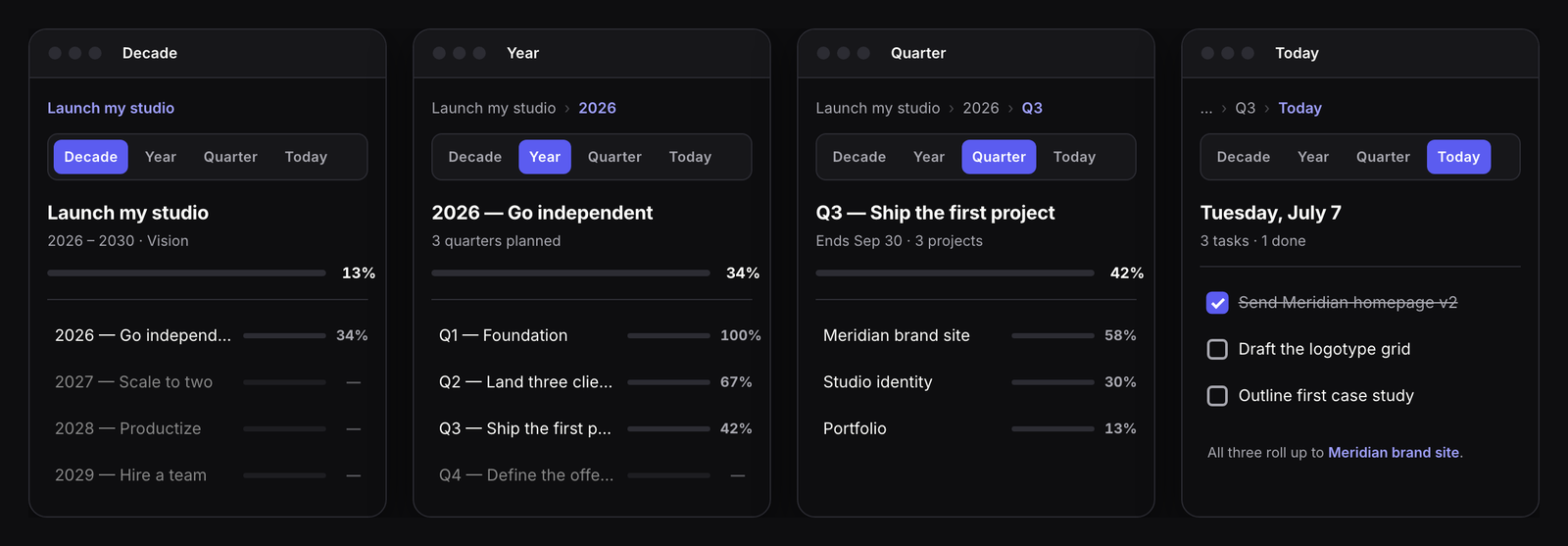
Not a mockup wall, the real product. Flight Deck for today, four zoom altitudes for the decade, and a thumb-first mobile app, all running the same plan.
Thumb-first, not shrunk-down
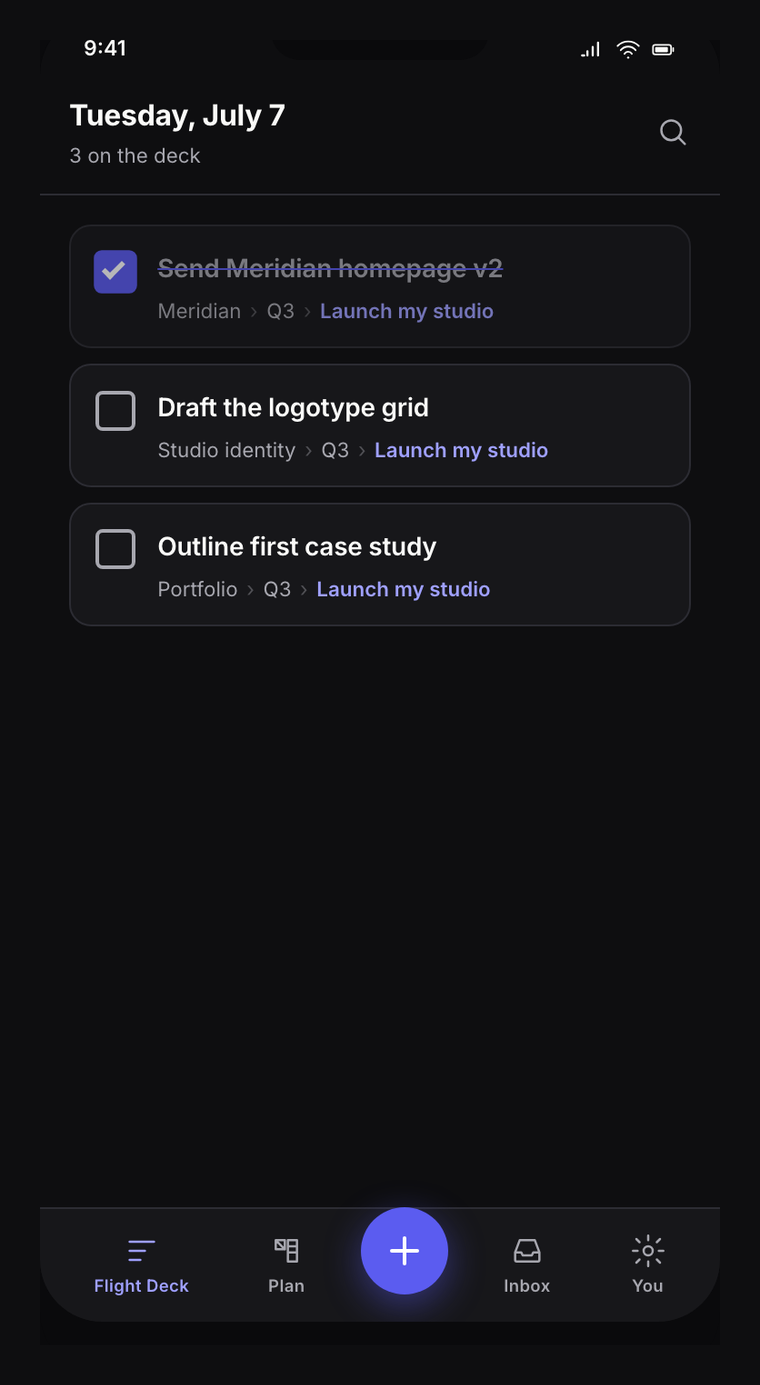
Your decade, in your pocket.
A PWA that installs to your home screen and captures offline. A bottom bar with a center capture button, built for thumbs, no hamburger, ever. The same calm surface and the same live roll-up, on the go.
Why this exists
You’ve bought and abandoned a task app before. So has the person building this. The whole product is one stubborn idea: stop splitting your decade from your day, and let the connection do the motivating.
One continuum
Decade → year → quarter → day, same data. Zoom is navigation, not a page swap.
Roll-up native
A leaf checked today visibly fills every bar above it. That’s the differentiator.
Anti-shame
No red overdue screaming. Overdue is “deferred,” not “failed.”
The problem
Your tools are split, so your attention splits with them.
Planning tools come in two disconnected halves. The gap between them is where the day-to-day drifts from the decade you said you wanted.
Roadmap tools live up high.
Quarterly OKRs, yearly themes, Notion “life OS” dashboards. They feel important at the planning retreat, then you close the tab and never look at them on a Tuesday.
Task managers live down low.
Todoist, Things, TickTick, excellent at today, blind to where today is going. A checked task vanishes into a void, and the quarter fills with motion but no direction.
The fix isn’t another list or board. It’s one navigable continuum, zoom out to see the decade, zoom in to see today, and let every completed task prove the connection is real.
The loop
Three steps, repeated until the decade is done.
Consumer planning apps live or die on one polished loop. This is ours, and it’s the only thing that has to be perfect.
Capture in under three seconds.
Press N anywhere, type, hit Enter. Every thought defaults to a safe Inbox, nothing is ever lost, and nothing demands a parent before it’s saved.
File it under a goal.
Give each task a home in the hierarchy. The breadcrumb becomes a reminder: this isn’t just a thing to do, it’s a piece of a year you chose on purpose.
Zoom out. Watch it climb.
Check a task today and the quarter, year, and decade bars fill, a 400ms spring, staggered 80ms per level upward. That stagger is the aha moment.
The honest comparison
We don’t win every row. We win the one that matters.
Most comparison tables flatter the maker. This one concedes real losses, because the buyer can tell, and because the row Decadrya wins is the one no incumbent’s architecture can copy.
| Capability | Task apps Todoist · Things |
Notion | Motion-class Sunsama · Motion |
Decadrya |
|---|---|---|---|---|
| Long-horizon structuredecade → day, native | Manual tags only | Possible with effort | Days & weeks | Native, the core |
| Daily executionfast capture, today view | Excellent, they win here | Adequate | Strong | Flight Deck, <3s |
| Progress roll-upleaf → ancestor, automatic | No hierarchy | Manual formulas | No long horizon | Native + animated |
| Auto-schedulingAI fills your calendar | , | , | Motion wins this, easily | AI drafts plans, not your day |
| Calm by designanti-shame, no streaks bait | Karma streaks | Endless canvas | Calm-leaning | Anti-shame by construction |
If you need a calendar auto-scheduler, buy Motion. If you want a flexible everything-app, Notion is unbeatable. Decadrya is for the person whose real problem is the gap between their decade and their Tuesday.
Design philosophy
Winners in this category win on feel.
Things won on feel. Sunsama won on an opinionated method. The polish bar isn’t decoration, it’s the product strategy. Four convictions hold the whole thing together.
Calm software
No red, no streak-shaming, no productivity score on the home screen. One muted momentum line is the only glance at trajectory.
Deterministic
Spring-physics zoom between four discrete levels, not a continuous gimmick. The same percentages are consistent at every altitude, zoom is navigation, not magic.
Offline-friendly
Built as a PWA-first. Offline-first sync is a post-v1 engineering epic, but the architecture is chosen so it’s reachable, not bolted on.
One accent, not a rainbow
Near-black surfaces and one electric indigo. Color is meaning, accent for action, green for done, amber for fair-use limits, never for lateness.
Pricing
Published, honest, below the category.
Below Motion and Sunsama ($19–20), at Todoist-Pro range, premium to nothing. Annual pushed hard, planning is an annual-psychology purchase.
Enough to feel the roll-up aha, not enough to live in.
Everything, unlimited, with the AI plan generator.
Beta members get 50% off for life. A later Pro+ tier ($12–15/mo) adds calendar sync, only if enough people ask for it.
Questions
The five things a skeptical buyer asks.
How is this different from the three tools I already quit?
The architecture, not the feature list. Task apps are flat lists or boards, great for today, blind to where today is going. Notion is an everything-canvas where you can build a hierarchy, but the roll-up is a formula you maintain. Decadrya is one native hierarchy where roll-up is the data model, not a feature you wire up.
If you’re happy in Todoist and never think past this week, stay there, it’s excellent. Decadrya is for the person who keeps a separate “big goals” doc that drifts out of sync.
What if I fall behind? Does it yell at me?
Never. There is no red, no streak counter, no productivity score. An overdue task is marked “deferred,” not “failed,” and it gently waits. The only nudge is a muted, dismissible weekly banner when your Inbox grows, because an orphan task without a parent is the one thing worth a gentle reminder.
The whole product is designed so that opening it after a bad week feels like relief, not a reckoning.
Where does my data live? Can I leave?
Postgres, on managed infrastructure (Neon/Vercel), with full export to JSON at any time from Settings. You can delete everything, account, hierarchy, history, in one click, and it’s gone for real, not soft-deleted. Your data is never sold or shared. Read the plain-English privacy policy.
Is there a mobile app?
Mobile-responsive PWA first, native apps later, and only if earned. The web app installs to your home screen and works offline for capture (true offline-first sync is a post-v1 epic). The bottom-nav with a center capture FAB is designed thumb-first; there’s no hamburger menu, ever.
Is the AI required? What does it actually do?
Optional, Pro-only, and framed honestly: it drafts structure you edit, it’s not an oracle. Describe a goal (“I want to go independent next year”), and it produces an editable quarter/project/task branch you correct. It’s capped at fair-use (~50 generations/mo, cents each) so a free tier can’t burn cash. It’s a head start, never a dependency.
Private beta · 50% for life
Stop splitting your decade from your day.
Join a small cohort through 2026. Free during beta, founding-member pricing forever for those who help shape it.